

For about three years, the space behind and under my desk looked like the back of an electronics store. One power strip connected to two extension cords, a mesh Wi-Fi node, a monitor, a laptop charger, and a USB hub. The cords sat on the floor in a loose pile. Every time I got on a video call and my camera was at the wrong angle, whoever I was talking to could see the whole mess. I kept meaning to fix it and kept not fixing it, because every solution I found either required drilling into the wall, buying a bunch of velcro ties and spending an hour reorganizing, or spending real money on some cable raceway kit that looked worse than the original problem. Then I bought the D-Line cable management box for just under $23. I have been using it daily for five months. This is what actually happened.
The D-Line box is not complicated. It is a plastic enclosure with a snap-on lid, two large cable entry slots on each end, and a flat bottom you can sit on a shelf or stick to the underside of a desk with the included tape strips. The point is to swallow your power strip and most of the cord tangle inside the box, so the only thing visible outside is the one or two cords running to your devices. That is the whole product. No app, no tools, no installation. The question is whether it actually works in daily use.
The Quick Verdict
Exactly what it claims to be: a clean, no-tools box that hides a power strip and cuts visible cords to almost zero. Not for thick cord bundles or small desks with nowhere to put it.
Amazon Check Today's Price →Still staring at that cord pile? The D-Line box takes about four minutes to set up.
Under $23 on Amazon. Fits most standard power strips. No drilling, no tools.
Amazon Check Today's Price on Amazon →How I Have Used It for Five Months
My setup when I bought the D-Line box: a 60-inch L-shaped desk, a Dell monitor, a laptop on a riser, a six-outlet power strip, an AC adapter for my mesh router, a USB-C hub, and a wireless charger. All of that ran back to one power strip sitting on the floor. I measured the power strip before ordering: it was a standard six-outlet model, about 12 inches long. The D-Line box I ordered is sized to handle that. The box arrived in a small flat package, and the assembly took me about three minutes. I set the power strip inside, routed the incoming power cable and the device cords out through the end slots, and clicked the lid closed.
I have since opened the box exactly three times in five months: once to add a cord when I got a new external drive, once to reroute a cable that was pinching under the lid, and once just to check whether any heat was building up inside (more on that below). Day to day I do not think about it. It sits on the desk shelf under my monitor and the only things I see coming out of it are the power cable going to the wall and three device cords going to my equipment. Before the box I counted nine loose cords visible in the desk area. Now I count three.
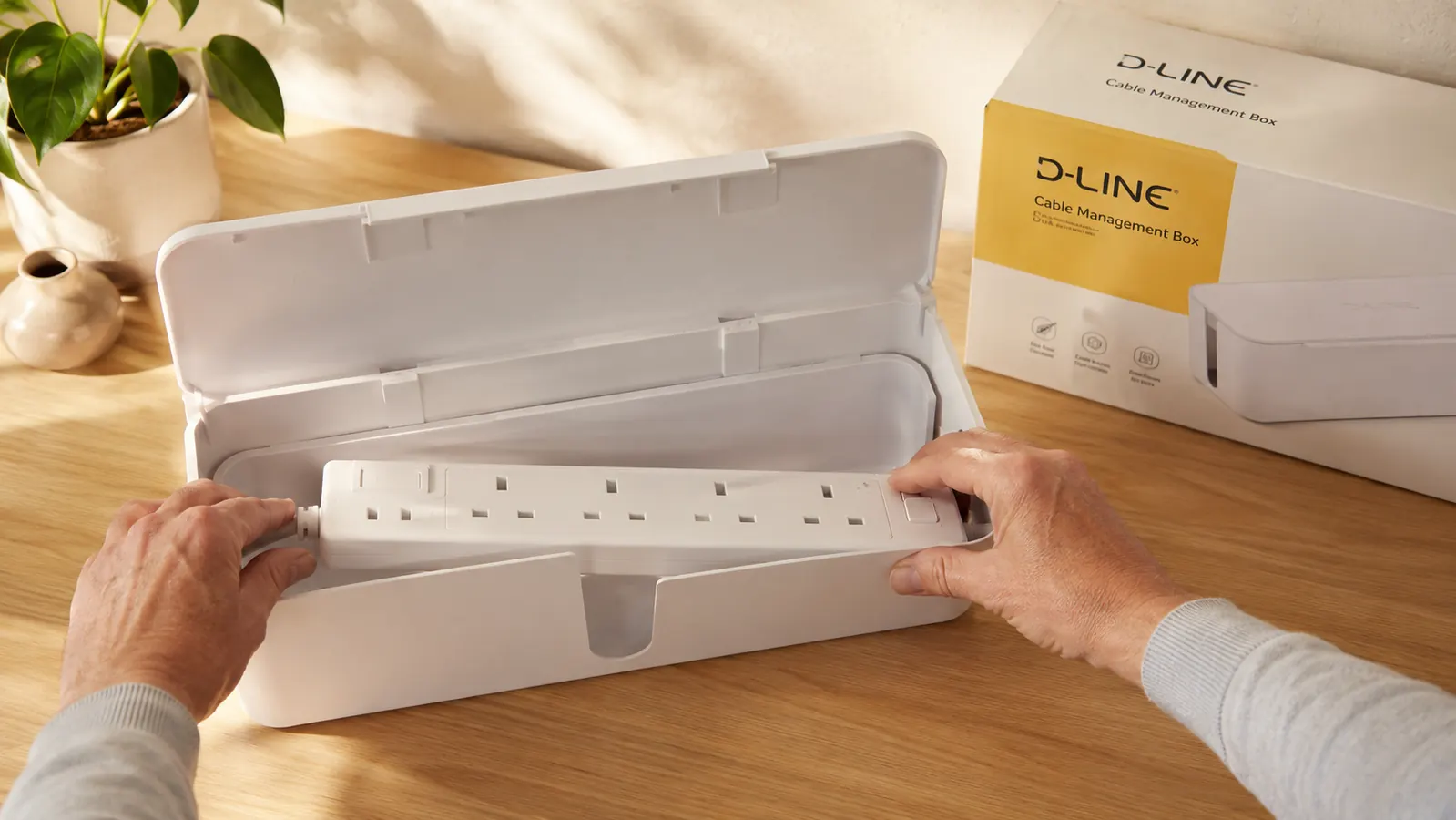
What It Does Well: Cable Count Drops Fast
The biggest benefit is also the most obvious one: the cord count visible on or around your desk drops sharply. Before, every device had its own cable running across the desk surface or down the back and pooling on the floor. After the D-Line box, those cords converge into the box and disappear. What exits the box is two things: the main power cord going to the wall outlet and whatever device cables you route out through the side slots. For me that dropped visible cords from nine to three in under ten minutes.
The end slots are wide and rounded, which matters more than it sounds. Cheap cable boxes have narrow slot cutouts that pinch thicker cables or scratch the insulation on cords over time. D-Line uses wider curved openings, and I have run a mix of thin USB-C cables and a fatter laptop power brick cord through them without any pinching over five months of daily use. The cord variety that fits is solid: USB-C, USB-A, standard power cables, and even a slightly thicker monitor cable fit through comfortably.
Before the D-Line box I counted nine visible cords around my desk. After setup I counted three. The whole change took about four minutes.
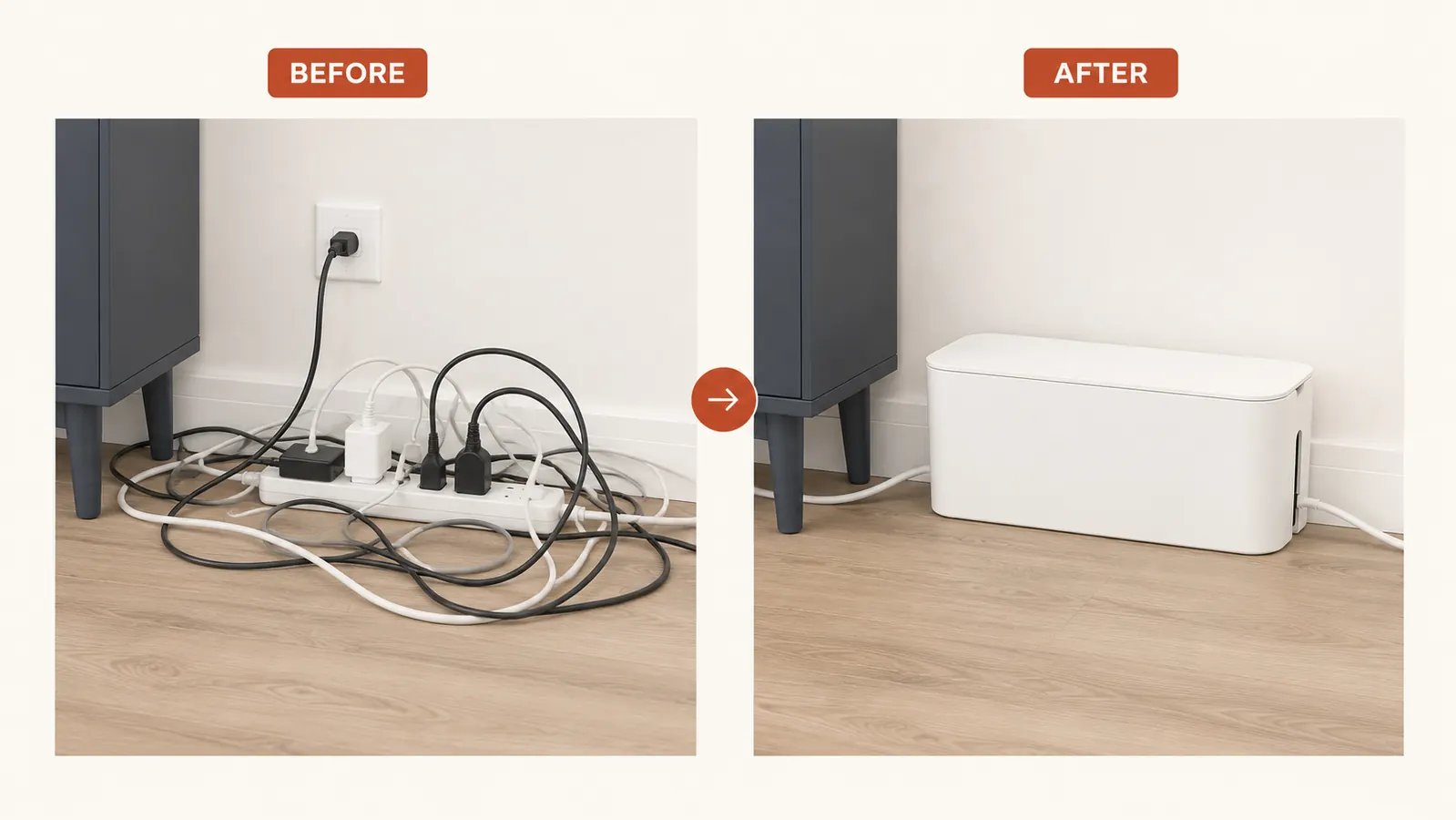
The Heat Question: What Five Months Taught Me
The most common concern people raise about cable management boxes is heat. You are putting a power strip, which can run warm under load, inside an enclosed plastic box. That is a fair concern. My honest finding after five months: it runs slightly warmer inside the box than if the power strip were sitting open on a desk, but not enough to worry me in a normal home office load. My setup draws power for a monitor, a laptop, a router node, and a phone charger. That is a moderate load, not a server rack. I checked the inside of the box at the three-month mark and it was warm to the touch but not hot.
Where this becomes a real concern is if you are running high-draw devices: gaming PCs, space heaters, high-wattage LED setups, or anything where the power strip is regularly pulling close to its rated capacity. D-Line does not market this box for those use cases, and I would not use it for them. For a standard home office drawing monitors, laptops, and phone chargers, the heat has not been an issue in my daily use. If your power strip regularly feels hot to the touch when it is exposed to open air, put it in a box with caution. If it runs cool or barely warm, the box is fine.
Build Quality and Lid Fit After Daily Use
The D-Line box is polypropylene plastic. It is not furniture-grade material. The finish is a smooth matte white that reads as clean and modern on a desk, but it does pick up scuff marks if you drag it across a rough surface. Mine has one small scuff from when I slid it into position against my desk riser mount. It has not yellowed in five months. The snap-on lid is where some buyers run into issues, and I want to be direct about this: the lid fit depends heavily on how many cords you are routing out of the side slots.
If you have three or fewer cords exiting the box, the lid snaps fully closed and stays closed. If you are trying to route five or six thick cords through one end slot, the lid will gap at that end. Mine runs three cords through one end and two through the other, and the lid closes flat and stays that way. If your setup requires more cables than that, you either need a second box or a different solution. This is the single biggest real-world limitation of the product and the primary source of one-star reviews. The box is not designed for cord-heavy setups. For a typical remote work desk, it handles the load well.
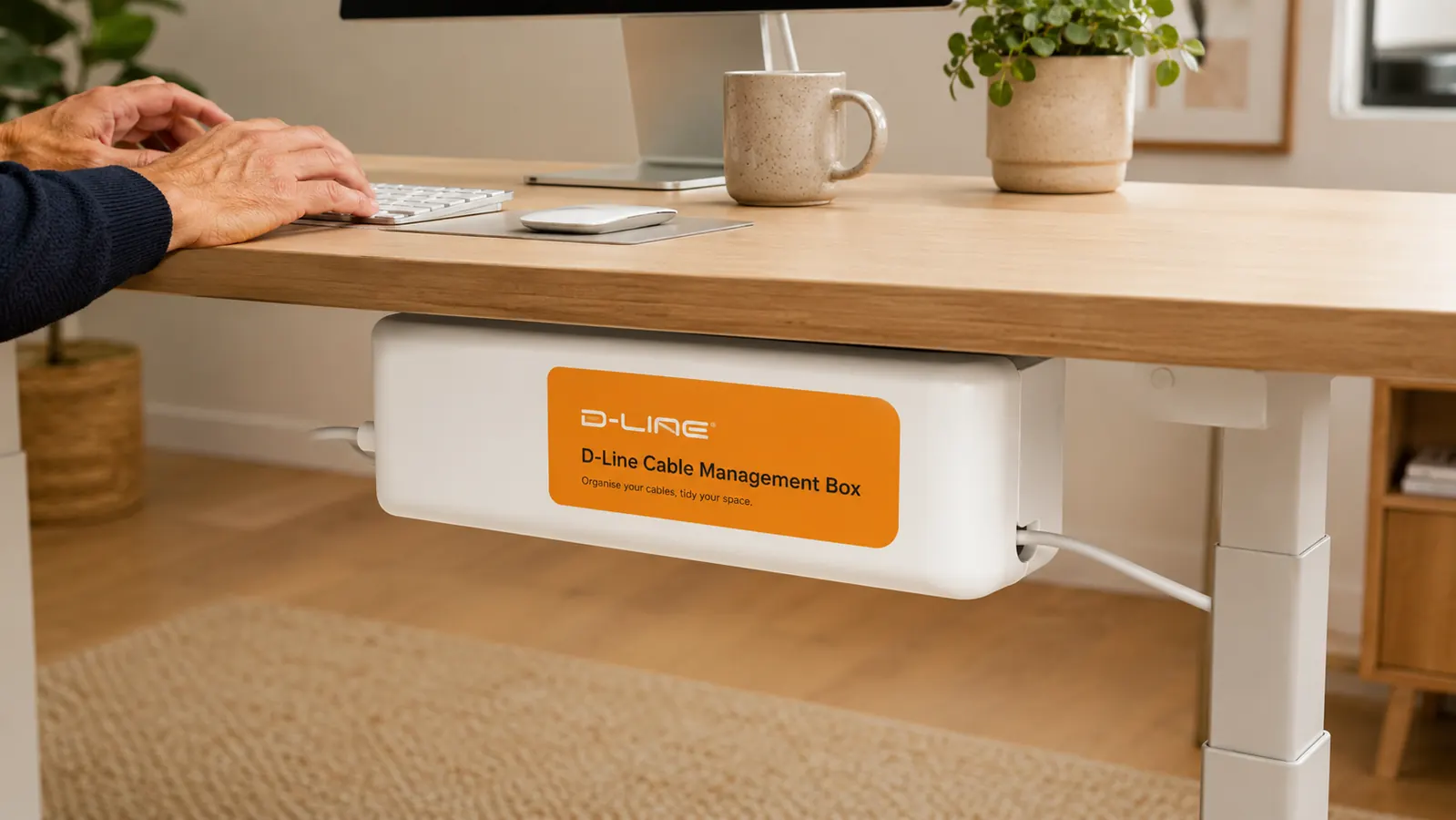
Desk Mounting vs Shelf Placement: What I Tried
D-Line includes adhesive tape strips for mounting the box to the underside of a desk or a wall. I tried both placements. My primary placement is on a shelf that sits below my main desk surface. That works well because the box sits stably without needing adhesive, and I can access the end slots easily when I need to reroute a cable. The underdesk mounting also worked: the tape strips held the box securely to the underside of my desk for about six weeks while I was testing that position. The adhesive eventually started releasing on one end when the weather got humid in early June.
For a permanent underdesk mount in a humid climate, I would recommend adding a couple of command strips in addition to the included tape, or using a small bungee cord looped around a desk rail. For the shelf placement, no adhesive is needed and it is a cleaner solution. If you have a printer stand or a desk hutch with a lower shelf, that is the easiest mounting situation for this box.
Alternatives I Considered and Why I Kept the D-Line
Before buying the D-Line I seriously considered two other approaches. The first was velcro cable ties and a cable sleeve: you bundle all your cords together with velcro wraps and run them inside a fabric sleeve down the back of the desk. I tried this about 18 months ago with a different desk setup. The result looks cleaner than loose cords, but you still see the bundle, and any time you add or remove a device you are cutting and re-wrapping ties or re-threading the sleeve. For a setup that changes rarely, it works. For a desk where I add and remove devices a few times a month, it was annoying. If you want to go deeper on this comparison, I wrote a more detailed breakdown in my D-Line vs velcro cable ties article.
The second option was a cable management tray mounted under the desk. These run $20 to $50, require more installation, and work well if most of your cords run horizontally between devices. My setup has a lot of vertical drops (monitor to power strip, laptop charger to power strip), so a horizontal tray would not have solved my visible-cord problem without also adding a box or cover somewhere. The D-Line box solved both problems at once: it contains the power strip and it becomes the consolidation point that a tray would route cords toward anyway. For my setup, the box was the simpler solution.
What I Liked
- Cuts visible desk cord count sharply in under 10 minutes with zero tools
- Lid slots are wide enough for a mix of cable types without pinching
- Clean matte white finish looks at home on any modern desk setup
- Works as a stable shelf placement without needing adhesive at all
- At under $23, the price is low enough that you lose nothing if it does not fit your setup
Where It Falls Short
- Lid gaps on the side where more than 3-4 thick cords exit at once
- Adhesive mounting strips lose grip in humid conditions without supplementation
- Plastic picks up scuffs if slid across rough surfaces
- Not appropriate for high-draw setups (space heaters, high-wattage equipment) due to enclosed airflow
- One size only: if your power strip is over 12-13 inches, it will not fit

Who This Is For
The D-Line cable management box is the right answer if you have a standard home office setup with a monitor, a laptop or desktop, and three to five devices plugged into one power strip, and the pile of cords on or around your desk bothers you. It is also a fast fix before a video call background cleanup. If you work from home full-time and you are tired of looking at the cord situation every day, this is the $23 fix that takes four minutes to set up. It is also sensible for retirees or freelancers who are not particularly technical and want a solution that does not require any tools, drilling, or watching a YouTube tutorial.
Who Should Skip It
Skip the D-Line box if your power strip regularly runs hot, if you have more than five or six cords exiting the box, or if you are running high-wattage devices through it. Also skip it if your desk has no shelf, hutch, or flat surface to place the box and you are not willing to use adhesive mounting under the desk. If your cord situation is severe enough that one standard power strip does not contain it (two power strips, multiple extension cords, floor-to-ceiling cable runs), you need a cable management tray system or raceway kit, not a box. For everything else, it earns its desk space. For more on the broader setup approach, my guide to hiding a power strip and desk cords without drilling covers the full workflow.
Five months in, I would buy it again. The cord count dropped and I stopped thinking about the setup.
The D-Line cable management box is currently under $23 on Amazon. No tools, no drilling, no subscription. Check if it fits your power strip before ordering.
Amazon Check Today's Price on Amazon →